k.ai Developments
This repository documents the development of k.ai, the generative AI system being built as part of the project Kaspar 2028. The repo serves four purposes: communicating current status and plans to external collaborators, maintaining detailed working records, easing onboarding for contributors who join during the project, and hosting the codebase.
This file kai_herofile.md summarizes all topics into a single informed overview. Most topics have a dedicated subfile containing detailled working notes.
File Management
Authors: Philip Gerdes, Malte Hillebrand, Lena Gieseke
File Change History:
| Date | Change | Author |
|---|---|---|
| 2026-08-11 | LiveLink-native motion ingestion architecture decided for Kimodo/SOMA → MetaHuman | Malte |
| 2026-06-11 | Avatar Animation Pipeline (+ Metrics ) added under new subpage “Layer Avatar Animation” | Malte |
| 2026-05-04 | Summary of Avatar Build & Minor Improvements | Malte |
| 2026-04-22 | First Version | Lena |
- k.ai Developments
- What is k.ai?
- System Architecture - 1. Live Rehearsal Improvisation
- System Architecture - 2. Digital Double Capturing
- Open Questions
- Risks
- Work In Progress Tracking
- Glossary
- References \& Links
What is k.ai?
K.ai is a real-time generative AI system built for theatrical rehearsal and improvisation. It serves as an interactive, non-human scene partner for actors in an improvisation scenario. The system perceives audio and video from the rehearsal room, processes these signals through a multimodal pipeline, and responds with synthesized speech and a moving visual avatar, displayed, e.g., on a screen or being projected. The avatar is not a simulated actor but a deliberately distorted entity and its errors and non-human deviations are the artistic material, not defects to be corrected. The avatar’s specific behavior, and appearance can be shaped and mutated by the humans (actors, director, stage designer …) during rehearsal.
The K.ai system is developed in the context the artistic-scientific research project Kaspar 2028 - AI as a Theatrical Toolbox, funded by the German Federal Cultural Foundation in the Art & AI. Hand in hand with the experimentation with K.ai, we are going to produce a repertoire-ready stage production of Peter Handke’s Kaspar at the Residenztheater in Munich, in May 2028.
Vision & Goals
The K.ai system should include the following features:
- Live improvisation between a human performer and an algorithmic, virtual avatar in the rehearsal room
- Experimentation with progressive distortion of the avatar into something alien and unstable
- A pipeline that creates a digital double of a performer, to a degree recognizable in appearance and voice, to be used as avatar basis
- Production of recordings of the avatar’s performance for re-use
- Operability without engineering competences
- A modular and extensible setup, easy to update to the newest developments
- Open source release for use by creatives
K.ai is explicitly NOT:
- A general-purpose AI-system trained on human performance
- A simulated actor substituting a human performer
- A chatbot-style dramaturgy assistant
- A tool for script analysis, play interpretation, or general Q&A
- A system aiming for human-likeness — the goal is productive distortion, not realism
- A replacement for human creative development
Usage Scenarios
Who does what, when, under what conditions?
Must Haves
1. Live Rehearsal Improvisation
- One performer enters a defined rehearsal space. The algorithmic avatar, is active. The performer speaks and moves and the system processes the audio and video stream through its pipeline, and responds, interrupts, acts up, etc. in real time.
- Human creatives can pre-configure the avatar’s personality, behavioral rules, or mutation parameters or adjust them on the fly via an interface.
- Scenes are recorded (Open question: What is exactly recorded?).
2. Digital Double Capturing
- A human performer can be digitized via a lightweight capture pipeline, ideally built from off the shelf hardware (e.g. consumer cameras, smartphones).
- The resulting digital double can be used as an avatar within K.ai with all functionality.
- Open question: What likeness is required?
Optional
Scripted performances
- A scene is pre-scripted and can be loaded in K.ai to be performed by the avatar and actor.
Performance VJing
- In addition to the performance of the avatar, there are some VJing options for humans to use during the performance, such as sequencing (the temporal arrangement of audiovisual clips or effects) to further modulate the generated audiovisual content.
Avatar Configuration
Presets and Mappings
Input-output relations
- Mappings from sensor signals to output behavior and stylization.
- Example: “the less the scene partner says, the more destroyed the avatar becomes”.
- These relations are pre-defined by the creative team.
Behavior bundles
- Predefined sets of behaviors (personality, mood, movement style, vocal character, etc.) that can be selected, switched and modified at runtime.
- Examples: animalistic movement patterns (“act like an elephant”)
Temporal Settings
- Response delays as expressive parameter
- Mutation trajectories, e.g., progressive divergence from 1:1 mirroring toward distortion
System Architecture - 1. Live Rehearsal Improvisation
Input / Output
Input triggers are understood as both
- direct input (explicit speech directed at the avatar) and
- indirect input (co-presence as, e.g., movement, proximity, posture).
| Input | Description |
|---|---|
| Audio stream | Microphone |
| Video stream | Camera feed |
| Text Prompts, Controller (slider, etc.) | Custom made GUI |
| Configuration File(s) | Open question: TOML, JSONC, plain text? |
| Stored scenes | Previously recorded K.ai outputs |
| Output | Format | Destination |
|---|---|---|
| Voice | Audio stream | Speakers in rehearsal room or theatre |
| Open question: Ambient sound / music? | Audio stream | Speakers in rehearsal room or theatre |
| Visual avatar | Video | Display / Projection / LED wall |
| Scene recordings | File (format TBD) | Archive for re-use on stage or as future input |
Processing Steps
To Do: Fill in avatar layer 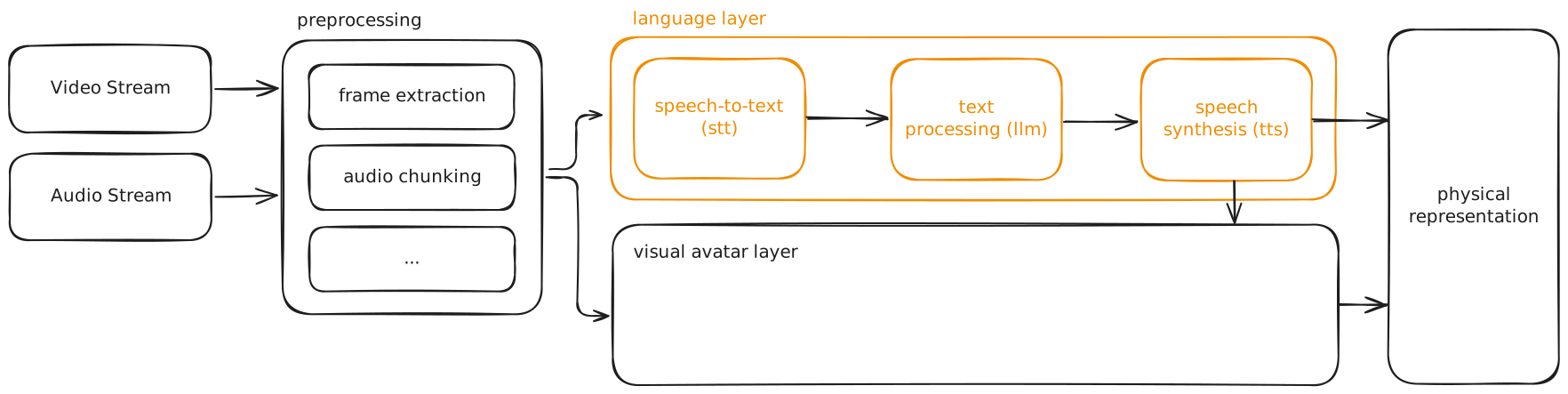
| Step | Description |
|---|---|
| Preprocessing | Frame extraction from video, audio chunking |
| STT Speech to Text | Transcription of microphone input |
| Pose & Motion Estimation | Extracts skeletal data, proximity, and posture from video to drive indirect input |
| LLM Large Language Model | Text processing and response generation, conditioned on behavior parameters from GUI and configuration |
| TTS Text to Speech | Voice synthesis for the avatar |
| Avatar Rendering | Composites the visual avatar from driving signals: raw or distorted video, pose data, LLM behavior tags, parameters from GUI, text prompt and config |
| Scene Recording & Loading | Captures session output to archive, or loads stored scenes as input |
Modularization
To Do: Update figure.
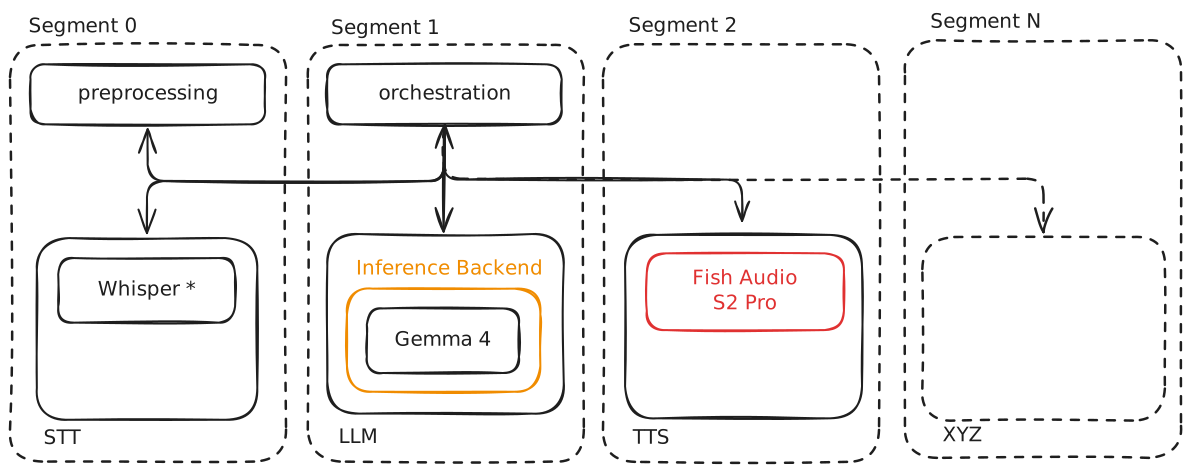
Topology
Two possible topologies:
| Mechanism | Benefits | Tradeoff |
|---|---|---|
| Single workstation with multiple dedicated GPUs, data exchange via CUDA IPC or shared memory | - Lowest latency | - Highest cost and complexity - Most likely not feasible with the available resources (competencies, budget, etc.) |
| Each segment as an independent server with OpenAI API compatible endpoint (the OpenAI schema as de facto standard for LLM, STT, and TTS services), IPC over local network (e.g. WebSockets) | - Highest flexibility - Works with existing hardware - Allows fallback to hosted APIs | - Network adds latency |
Chosen Approach (22.04.2026): Each processing segment runs as an independent server.
Architectural Layers
| Layer | Tech | Notes |
|---|---|---|
| Hardware | Multiple workstations with dedicated GPUs | One per segment, distributed via local network |
| OS | TBD: Linux for inference segments, Windows for the Avatar engine and distortion | Windows constraint comes from the Spout dependency |
| Orchestration | LiveKit Agents | Pipeline management across all processing steps |
| Preprocessing | TBD | Frame extraction, audio chunking, turn detection, additional sensing signals |
| STT | TBD | Candidates: Whisper, faster-whisper, Gemma 4 native audio |
| Motion Estimation | TBD | Drives indirect input from camera feed |
| LLM | TBD | Preference: local inference, OpenAI compatible endpoint, permissive license |
| TTS | TBD | Candidates: Fish Audio S2 Pro (license TBD), others |
| Avatar Engine | Unreal Engine + MetaHuman, Vertex shaders, bone manipulation, ComfyUI | LiveLink, FaceBuilder? Spout is Windows only, pinning this segment to a Windows node^1 |
| Control & Configuration | TBD | - GUI controls - Configuration files - Avatar configuration and prompt library - Saved scenes |
| Scene Recording | TBD | Format and storage layer for stored scenes referenced below |
^1: Integration: capturing the Spout output in an external application (OBS, a Python script using spoutGL, etc.) and have that application publish to LiveKit, since no first party LiveKit Unreal plugin exists.
Orchestration
Coordination across segments is handled by LiveKit Agents, an open source Python and Node.js framework for stateful, multimodal AI agents that join WebRTC rooms as participants and orchestrate STT, LLM, TTS, and vision plugins for realtime voice and video interaction.
WebRTC (Web Real Time Communication) is a low latency protocol use by LiveKit for realtime audio, video, and data streams, to handle transport and synchronization between distributed processing segments. Each segment joins a shared session (“room”) as a participant, which removes the need for a custom sync layer between microphone input, avatar video, and synthesized voice.
| Decision | Options Considered | Chosen Approach | Reasoning | Date |
|---|---|---|---|---|
Preprocessing
Frame Extraction
- From the video stream, fan out to downstream consumers (pose estimation, avatar compositing, optional vision capable LLM input).
- Frame rate and resolution per consumer should be set independently to avoid overfetching.
Audio Chunking
- For STT input, driven by Voice Activity Detection (VAD) rather than fixed time windows.
- Silero VAD is the de facto open source standard and is natively integrated into
faster-whisper. Tunable parameters: activation threshold, silence duration, prefix padding.
Turn Detection
- The related but distinct decision of when the user has finished speaking and the avatar should respond.
- Three common strategies
- VAD timeout (simple, prone to interrupting pauses)
- Semantic VAD (LLM judges utterance completeness, higher latency)
- Dedicated turn detection models (e.g. LiveKit’s transformer based detector)
- For k.ai we also want to deliberately misjudge turn boundaries (interrupting, pausing too long, responding to half utterances).
Additional Sensing
- Additional sensing signals for co-presence input (skeletal pose, proximity, gaze, gesture). These feed the Motion Estimation step rather than STT, but share the preprocessing concern of synchronization with audio and video frames so downstream stages see a temporally coherent snapshot.
| Decision | Options Considered | Chosen Approach | Reasoning | Date |
|---|---|---|---|---|
STT
TODO
| Decision | Options Considered | Chosen Approach | Reasoning | Date |
|---|---|---|---|---|
Motion Estimation
TODO
| Decision | Options Considered | Chosen Approach | Reasoning | Date |
|---|---|---|---|---|
LLM
TODO
| Decision | Options Considered | Chosen Approach | Reasoning | Date |
|---|---|---|---|---|
TTS
TODO
| Decision | Options Considered | Chosen Approach | Reasoning | Date |
|---|---|---|---|---|
Avatar Engine
The Avatar Engine utilizes the MetaHuman ecosystem within Unreal Engine to create, animate, and stylistically manipulate digital clones of actors in real-time. By leveraging a suite of likeness tools, it bridges the gap between physical performance and high-fidelity virtual representation.
Base architecture: MetaHuman in Unreal Engine
Input:
- Motion capture: Real-time skeletal and facial data streamed via the LiveLink protocol, utilizing sources like the Live Link Face iOS app, camera feed, MoCap suits, or a custom LiveLink Source for AI-generated skeletal motion (Kimodo/SOMA)
- Face mesh via FaceBuilder or Photogrammetry to refine facial geometry and likeness by transfering 2D reference photos to a 3D head mesh, which is then solved into a MetaHuman Identity
Animations
Driving MetaHumans requires a multi-modal approach to balance real-time performance with high-fidelity input
Input & Blending
- LiveLink: The standard interface for streaming real-time facial (ARKit), body (MoCap), and camera data directly into Unreal Engine, including a custom C++ Source built for AI-generated motion (Kimodo/SOMA)
- Pre-Built Animations: Uses UE Blendspaces to interpolate between existing animations
- Bottleneck: Creating a comprehensive library of pre-built animations remains a significant manual labor challenge
Procedural & AI-Driven Animation
Modern pipelines focus on generating expressive movement from audio or text to bypass manual rigging constraints
Facial Animation (Audio-to-Face)
- MetaHuman Animator: A native UE plugin providing real-time audio-to-mouth movement, though it often lacks emotional depth and micro-expressions
- NVIDIA Audio2Face: Generates highly expressive, AI-driven facial animations from audio sources in real-time
Full-Body & Gestural Generation
- NVIDIA Kimodo: A full-rig diffusion model that generates skeletal animation from text prompts; operates at near real-time (~2–5s) and requires rig retargeting — via a custom LiveLink Source + Remap Asset pipeline (see Decision log below)
- NVIDIA ACE (Avatar Cloud Engine): A comprehensive workflow integrating NLP, LLM logic, and automated facial animation drivers
- DiDiffGes (SOTA 2025): Real-time speech-to-gesture generation using an efficient 10-step sampling process
- AsynFusion (SOTA 2025): Synchronizes parallel facial and body animation for natural cohesion, currently limited to non-real-time contexts
Distortions
A modular distortion layer is applied to the avatar’s output after the animation data has been processed.
This ensures that the actor’s performance and underlying “body language” remain intact even as the visual representation is radically transformed.
Distortion layer (applied after animation):
- Mesh distortion: Real-time scaling and rotation of the skeletal rig
- Vertex shader deformations: Deforming the mesh geometry directly on the GPU for non-linear warping
- Neural Style Transfer & Diffusion: Using ONNX within UE or transferring framebuffers to ComfyUI for real-time AI-driven restyling
- Scrambled LiveLink association: Re-mapping input data to different output targets (e.g., using eye movement to drive arm transforms)
| Decision | Options Considered | Chosen Approach | Reasoning | Date |
|---|---|---|---|---|
| Motion ingestion architecture for Kimodo/SOMA → MetaHuman | (a) Blueprint OSC parsing → Control Rig → hidden Dummy mesh → IK Retargeter (original approach); (b) Custom C++ LiveLink Source → Remap Asset → MetaHuman AnimBP directly | (b) — LiveLink-native pipeline | The Blueprint/Control Rig/Dummy chain didn’t generalize: axis swizzles were hardcoded per-dataset and rest-pose offsets were manual. A LiveLink Source publishing the raw source skeleton (not baked to MetaHuman names) is reusable for any future OSC-based mocap source without recompiling C++; target-specific mapping and rest-pose offsets move into an editable Remap Asset / data table instead. Trade-off accepted: the IK Retargeter’s chain-based solve is gone, so rest-pose/offset authoring is still manual work, just relocated. | 2026-08-11 |
Control & Configuration
TODO
GUI
Input Files
Avatar Configuration and Prompt Library
Scene Recording
System Architecture - 2. Digital Double Capturing
TODO
Open Questions
| Question | Context | Owner | Status |
|---|---|---|---|
| Fish Audio S2 Pro license | Currently “research use only”, does that apply to us? | Lena | WIP |
| How to define indirect / co-presence input technically? | What signals, at what granularity, map to what behaviors? | Open | |
| Ethical AI | Compatible with latency and multimodal requirements? | Open | |
| Configuration file format | TOML, YAML, JSONC, or plain text? Affects prompt library, session config, and scene recall files. Tradeoff between footguns and tooling. | Open | |
| Scene recording format and storage | What gets archived (video, audio, parameter snapshots, transcripts, all of the above)? Where and in what format? | Open | |
| Latency budget per pipeline segment | Targets currently TBD across all segments. Required to validate the distributed topology against realtime constraints. | Open | |
| Ambient sound and music output | Separate audio stream, mixed with voice, or out of scope? | Open | |
| How to support a “co-presence”? | E.g., with a spatial audio setup | Open | |
| Which terminology to use? | Is K.ai the whole system (as used in this document) or the avatar? Do we want to deal with anthropomorphizing language? | Open |
Risks
| Risk | Likelihood | Impact | Mitigation |
|---|---|---|---|
| Latency too high for live improvisation | High | High | Local inference; GPU-per-module; minimize network hops; fallback to hosted APIs |
| LLM output too coherent and “normal” | Medium | High | Think about “breaking” the system? |
| Team unfamiliarity with Linux | Medium | Medium | Evaluate WSL/Docker; Windows as fallback with performance trade-off |
| Hardware insufficient for real-time multi-segment pipeline | Medium | Medium | Profile early; design fallback to hosted APIs; New hardware purchases |
Work In Progress Tracking
Active Tasks
- Initial architecture validation: STT → LLM → TTS pipeline with LiveKit Agents
- LLM module: Gemma 4 local inference setup (vLLM / ollama)
- Avatar layer: MetaHuman rig + LiveLink + distortion prototype
Backlog
Features and tasks queued but not yet started.
| Item | Priority | Owner | Notes |
|---|---|---|---|
Done
Completed items worth recording for context.
Glossary
Domain-specific or project-specific terms defined for external readers.
| Term | Definition |
|---|---|
| K.ai / Kaspar.ai | The AI system developed for Kaspar 2028 |
| STT | Speech-to-text: converts spoken audio to text |
| LLM | Large language model: generates text responses |
| TTS | Text-to-speech: synthesizes spoken audio from text |
| RAG | Retrieval-Augmented Generation: extends LLM context with retrieved documents |
| MetaHuman | Unreal Engine tool for creating high-fidelity digital humans |
| LiveLink | Unreal Engine protocol for streaming real-time animation data |
| Spout | Windows framework for sharing GPU video buffers between applications |
| Virtual Production | Real-time CGI techniques for filmmaking |
| Co-presence | The felt sense of sharing a space with another agent, sustained by mutual awareness and continuous low level signaling (gaze, posture, proximity, breath, etc.) rather than by explicit interactions. |
| Brain damage | Working metaphor for the system: deliberately broken or scrambled to produce alien, non-human behavior |
References & Links
TODO